Get Started — Overview
The Bridge Connector is a lightweight C-based communication layer that exposes two dedicated TCP sockets for client applications. One socket accepts inbound request strings (orders or commands) from clients; the other socket sends outbound responses (acknowledgements, execution reports, errors) back to the client.
This interface is designed to be:
- Simple (plain string messages)
- Low-latency (suitable for trading/order flows)
- Language-agnostic (clients can be written in C, C++, Python, Java, Perl, etc.)
- Secure when used with the authentication options described below
High-level Architecture
| TCP |
|---|
Client App
(sends strings) |
-- Request Socket --> |
Bridge Service
(C executable) |
| <-- Response Socket -- |
Key points
- Request Socket: Client -> Bridge (orders/commands)
- Response Socket: Bridge -> Client (ack/status/error)
- Two independent TCP connections avoid head-of-line blocking and make it easier for client code to separate write/read logic.
- Messages are plain text (UTF-8 recommended) and terminated by a newline (\n) or null (\0) depending on your preference.
Features
- Low latency socket communication
- Request/response based order handling
- Market data broadcast
- RMS and margin validation
Connection Details
Protocol: TCP
Default ports (example):
- Request socket (client -> bridge): 9090
- Response socket (bridge -> client): 9091
Address: Bind to 0.0.0.0 on the server for production, or 127.0.0.1 for local testing.
Message encoding: UTF-8 (recommended)
Message termination: \n (newline). All messages MUST be terminated by newline to allow proper framing.
Max message length: 4096 bytes (configurable)
- Request code
2000 : New Order Request
2040 : Order Modify Request
2070 : Order Cancel Request
- Response code
2222 : Order Trade Confirmation
2073 : New Order Confirmation
2074 : Oder Modification Confirmation
2075 : Order Cancel Confirmation
- Exchange Numbers
NSE Stocks & Index Future(NFO) : 2
NSE Stocks & Index Option(NOP) : 5
- Token No
Token no which we get from contract master
- Echoback
This field is used for identifying response for corresponding request which is given by user, in response we will send same value of echoback which will be received in request
REQUEST New Order
2000|5|52166|BANKNIFTY|02/24/2022|OPTIDX|36200.00|CE|PRO|0|202202241021|1|25|35|2|0.0|25|0
| Pos | Field | Description |
|---|
| 1 | 2000 | New Order Request |
| 2 | 5 | Exchange identifier |
| 3 | 52166 | Instrument token |
| 4 | BANKNIFTY | Trading symbol |
| 5 | 02/24/2022 | Contract expiry |
| 6 | OPTIDX | Instrument type |
| 7 | 36200.00 | Option strike price |
| 8 | CE | Option Type |
| 9 | PRO | Trading client |
| 10 | 0 | Order Id |
| 11 | 202202241021 | Echo Back Client reference |
| 12 | 1 | Order Type Market / Limit |
| 13 | 25 | Order quantity |
| 14 | 35 | Order price |
| 15 | 2 | Order action 1=Buy, 2=Sell |
| 16 | 0.0 | SL trigger price |
| 17 | 25 | Total order quantity |
| 18 | 0 | Remain quantity |
REQUEST Modify Order
2040|5|52166|BANKNIFTY|02/24/2022|OPTIDX|36200.00|CE|PRO|404404480000101|202202241021|1|25|35|2|0.0|25|0
| Pos | Field | Description |
|---|
| 1 | 2040 | Modify Request |
| 2 | 5 | Exchange identifier |
| 3 | 52166 | Instrument token |
| 4 | BANKNIFTY | Trading symbol |
| 5 | 02/24/2022 | Contract expiry |
| 6 | OPTIDX | Instrument type |
| 7 | 36200.00 | Option strike price |
| 8 | CE | Option Type |
| 9 | PRO | Trading client |
| 10 | 404404480000101 | Order Id |
| 11 | 202202241021 | Echo Back Client reference |
| 12 | 1 | Order type Market / Limit |
| 13 | 25 | Order quantity |
| 14 | 35 | Order price |
| 15 | 2 | Order action 1=Buy, 2=Sell |
| 16 | 0.0 | SL trigger price |
| 17 | 25 | Total order quantity |
| 18 | 0 | Remain quantity |
REQUEST Cancel Order
2070|5|52166|BANKNIFTY|02/24/2022|OPTIDX|36200.00|CE|PRO|404404480000101|202202241021|1|25|35|2|0.0|25|0
| Pos | Field | Description |
|---|
| 1 | 2070 | Cancel Request |
| 2 | 5 | Exchange identifier |
| 3 | 52166 | Instrument token |
| 4 | BANKNIFTY | Trading symbol |
| 5 | 02/24/2022 | Contract expiry |
| 6 | OPTIDX | Instrument type |
| 7 | 36200.00 | Option strike price |
| 8 | CE | Option Type |
| 9 | PRO | Trading client |
| 10 | 404404480000101 | Order Id |
| 11 | 202202241021 | Echo Back Client reference |
| 12 | 1 | Order type Market / Limit |
| 13 | 25 | Order quantity |
| 14 | 35 | Order price |
| 15 | 2 | Order action 1=Buy, 2=Sell |
| 16 | 0.0 | SL trigger price |
| 17 | 25 | Total order quantity |
| 18 | 0 | Remain quantity |
RESPONSE Order Confirmation
2073|5|52166|BANKNIFTY|02/24/2022|OPTIDX|36200.00|CE|PRO|404404480000101|0|0|35.0000|202202241021|2|0|0|1330161808|1330161808|12345|123456789012345|25|25
| Pos | Field | Description |
|---|
| 1 | 2073 | Order Confirmation |
| 2 | 5 | Exchange identifier |
| 3 | 52166 | Instrument token |
| 4 | BANKNIFTY | Trading symbol |
| 5 | 02/24/2022 | Contract expiry |
| 6 | OPTIDX | Instrument type |
| 7 | 36200.00 | Option strike price |
| 8 | CE | Option Type |
| 9 | PRO | Trading client |
| 10 | 404404480000101 | Order Id |
| 11 | 0 | Trade No |
| 12 | 0 | Executed quantity |
| 13 | 35.0000 | Execution price |
| 14 | 202202241021 | Echo Back Client reference |
| 15 | 2 | 1=Buy, 2=Sell |
| 16 | 0 | Error Code |
| 17 | 0 | Reason Code |
| 18 | 1330161808 | Exchange timestamp |
| 19 | 1330161808 | Last modification time |
| 21 | 12345 | Participent (client id) |
| 22 | 123456789012345 | Term Ctcl |
| 23 | 25 | Remain quantity |
| 24 | 25 | Total original quantity |
RESPONSE Modify Confirmation
2074|5|52166|BANKNIFTY|02/24/2022|OPTIDX|36200.00|CE|PRO|404404480000101|0|0|35.0000|202202241021|2|0|0|1330161808|1330161808|12345|123456789012345|25|25
| Pos | Field | Description |
|---|
| 1 | 2074 | Order Modification Confirmation |
| 2 | 5 | Exchange identifier |
| 3 | 52166 | Instrument token |
| 4 | BANKNIFTY | Trading symbol |
| 5 | 02/24/2022 | Contract expiry |
| 6 | OPTIDX | Instrument type |
| 7 | 36200.00 | Option strike price |
| 8 | CE | Option Type |
| 9 | PRO | Trading client |
| 10 | 404404480000101 | Order Id |
| 11 | 0 | Trade No |
| 12 | 0 | Executed quantity |
| 13 | 35.0000 | Execution price |
| 14 | 202202241021 | Echo Back Client reference |
| 15 | 2 | 1=Buy, 2=Sell |
| 16 | 0 | Error Code |
| 17 | 0 | Reason Code |
| 18 | 1330161808 | Exchange timestamp |
| 19 | 1330161808 | Last modification time |
| 21 | 12345 | Participent (client id) |
| 22 | 123456789012345 | Term Ctcl |
| 23 | 25 | Remain quantity |
| 24 | 25 | Total Original quantity |
RESPONSE Cancel Confirmation
2075|5|52166|BANKNIFTY|02/24/2022|OPTIDX|36200.00|CE|PRO|404404480000101|0|0|35.0000|202202241021|2|0|0|1330161808|1330161808|12345|123456789012345|25|25
| Pos | Field | Description |
|---|
| 1 | 2075 | Order Cancel Confirmation |
| 2 | 5 | Exchange identifier |
| 3 | 52166 | Instrument token |
| 4 | BANKNIFTY | Trading symbol |
| 5 | 02/24/2022 | Contract expiry |
| 6 | OPTIDX | Instrument type |
| 7 | 36200.00 | Option strike price |
| 8 | CE | Option Type |
| 9 | PRO | Trading client |
| 10 | 404404480000101 | Order Id |
| 11 | 0 | Trade No |
| 12 | 0 | Executed quantity |
| 13 | 35.0000 | Execution price |
| 14 | 202202241021 | Echo Back Client reference |
| 15 | 2 | 1=Buy, 2=Sell |
| 16 | 0 | Error Code |
| 17 | 0 | Reason Code |
| 18 | 1330161808 | Exchange timestamp |
| 19 | 1330161808 | Last modification time |
| 20 | 12345 | Participent (client id) |
| 21 | 123456789012345 | Term Ctcl |
| 22 | 25 | Remain quantity |
| 23 | 25 | Total Original quantity |
TRADE Trade Confirmation
2222|5|52166|BANKNIFTY|02/24/2022|OPTIDX|36200.00|CE|PRO|404404480000101|20046|25|35.0000|202202241021|2|0|0|1330161808|1330161808|12345|123456789012345|0|25
| Pos | Field | Description |
|---|
| 1 | 2222 | Trade Confirmation |
| 2 | 5 | Exchange identifier |
| 3 | 52166 | Instrument token |
| 4 | BANKNIFTY | Trading symbol |
| 5 | 02/24/2022 | Contract expiry |
| 6 | OPTIDX | Instrument type |
| 7 | 36200.00 | Option strike price |
| 8 | CE | Option Type |
| 9 | PRO | Trading client |
| 10 | 404404480000101 | Order Id |
| 11 | 20046 | Trade No |
| 12 | 25 | Executed quantity |
| 13 | 35.0000 | Execution price |
| 14 | 202202241021 | Echo Back Client reference |
| 15 | 2 | 1=Buy, 2=Sell |
| 16 | 0 | Error Code |
| 17 | 0 | Reason Code |
| 18 | 1330161808 | Exchange timestamp |
| 19 | 1330161808 | Last modification time |
| 20 | 12345 | Participent (client id) |
| 21 | 123456789012345 | Term Ctcl |
| 22 | 0 | Remain quantity |
| 23 | 25 | Total Original quantity |
REJECT Rejection
-9999|5|52166|BANKNIFTY|02/24/2022|OPTIDX|36200.00|CE|PRO|Rejected|0|0|35|202202241021|2|-1106|0|0|0|12345|123456789012345|0|25|Dealer TotalBuyValue M:50000.00 N:49300.50
| Pos | Field | Description |
|---|
| 1 | -9999 | Rejection |
| 2 | 5 | Exchange identifier |
| 3 | 52166 | Instrument token |
| 4 | BANKNIFTY | Trading symbol |
| 5 | 02/24/2022 | Contract expiry |
| 6 | OPTIDX | Instrument type |
| 7 | 36200.00 | Option strike price |
| 8 | CE | Option Type |
| 9 | PRO | Trading client |
| 10 | Rejected | Order Id |
| 11 | 0 | Trade No |
| 12 | 0 | Executed quantity |
| 13 | 35 | Execution price |
| 14 | 202202241021 | Echo Back Client reference |
| 15 | 2 | 1=Buy, 2=Sell |
| 16 | -1106 | Error Code |
| 17 | 0 | Reason Code |
| 18 | 0 | Exchange timestamp |
| 19 | 0 | Last modification time |
| 20 | 12345 | Participent (client id) |
| 21 | 123456789012345 | Term Ctcl |
| 22 | 0 | Remain quantity |
| 23 | 25 | Total Original quantity |
| 23 | Dealer TotalBuyValue M:50000.00 N:49300.50 | Error Message |
Broadcast Format
57439|NIFTY|5|03/03/2022|OPTIDX|PE|17400.00|50|76625|73550|150|73490|550|73930|50|73935|200|25400|0
| Pos | Field | Description |
|---|
| 1 | 57439 | Token |
| 2 | NIFTY | Scrip |
| 3 | 5 | Exchange |
| 4 | 03/03/2022 | Expiry_date |
| 5 | OPTIDX | Instrument |
| 6 | CE | Option Type |
| 7 | 17000.00 | Strike price |
| 8 | 50 | Last trade quantity |
| 9 | 9165 | Last traded price |
| 10 | 9150 | Bid price1 |
| 11 | 900 | Bid quantity1 |
| 12 | 9145 | Bid price2 |
| 13 | 500 | Bid quantity2 |
| 14 | 9170 | Ask price1 |
| 15 | 400 | Ask quantity1 |
| 16 | 9175 | Ask price2 |
| 17 | 900 | Ask quantity2 |
| 18 | 53087000 | Total traded quantity |
| 19 | 0 | Open interest |
Socket Authentication
You MUST protect production sockets. Below are recommended options from simple to most secure.
Shared Secret (Simple)
- Client sends a secret key as the first message after connecting.
- Server validates the secret; if invalid, server closes the connection.
Pros: Easy to implement.
Cons: Secret can be intercepted unless used with TLS.
Handshake example:
1. Server sends AUTH_REQUIRED\n
2. Client sends AUTH|<secret-key>\n
3. Server replies AUTH_OK\n or AUTH_FAIL\n
Heartbeat / Keepalive
- Implement periodic heartbeat messages such as PING\n / PONG\n to detect dead sockets and network issues.
- OS-level TCP keepalive should also be enabled.
Order Request/Response Client Example (Authenticated)
A complete, runnable client that builds an order request string, sends it on the request socket, and
reads and validates the response on the response socket. It uses the same shared-secret handshake
described in Socket Authentication on both sockets, and the same request/response
field layouts documented in New Order and Order
Confirmation. If your client runs on the same trusted machine/network as the Bridge and you don't
need this handshake, see Order Request/Response Client Example
(Trusted, No Auth) below instead.
Scenarios covered
- Local request validation - the request code is checked against the known codes
before anything is sent, so a typo doesn't reach the server as a malformed message.
- Authentication on both sockets - request and response sockets are authenticated
independently using the shared-secret handshake.
- Connection failures - server unreachable, connection refused, or timed out while
connecting.
- Authentication failures - wrong secret, connection dropped mid-handshake, or an
unexpected reply that doesn't match the documented protocol.
- Empty/closed response - the server closes the connection before sending a
response.
- Unrecognized response code - a response code outside the documented set.
- Field display - every response field is printed using its documented name (see
Order Confirmation), not just its raw position.
Note: this script performs a single request/response cycle and then exits - it's a
reference example to adapt into a long-lived client. See
Performance & Best
Practices for keeping sockets long-lived in production.
Configuration
REQUEST_ADDR = ("localhost", 9090) # request socket (client -> bridge)
RESPONSE_ADDR = ("localhost", 9091) # response socket (bridge -> client)
AUTH_KEY = "CHANGE_ME_SHARED_SECRET" # shared secret, must match the server
request_client_auth.py
#!/usr/bin/env python3
"""
Request/response order client - reference example (authenticated).
Builds an order request string, sends it on the request socket, then
reads and validates the response on the response socket. Both sockets
use the shared-secret handshake described in "Socket Authentication".
Scenarios covered:
- Local validation of the request code before anything is sent.
- Shared-secret authentication on both the request and response sockets.
- Connection failures (server unreachable, connection refused/reset).
- Authentication failures / unexpected handshake replies.
- Empty/closed response from the server.
- Unrecognized response codes.
- Displaying every response field using its documented name.
This script performs a single request/response cycle and then exits -
it's a template to adapt into a long-lived client (see "Performance &
Best Practices" for keeping sockets long-lived in production).
If your client runs on the same trusted machine/network as the Bridge,
see request_client_no_auth.py for a simpler version without this
handshake.
"""
import socket
# Request/response use two separate sockets - one to send order
# requests, one to read the corresponding confirmations/rejections.
REQUEST_ADDR = ("localhost", 9090) # request socket (client -> bridge)
RESPONSE_ADDR = ("localhost", 9091) # response socket (bridge -> client)
# Shared secret key both client and server must agree on (see
# "Socket Authentication"). Change this before pointing at a real server.
AUTH_KEY = "CHANGE_ME_SHARED_SECRET"
def authenticate(sock: socket.socket, key: str) -> bool:
"""
Perform the shared-secret handshake (see "Socket Authentication")
on an already-connected socket:
server -> "AUTH_REQUIRED\\n"
client -> "AUTH|\\n"
server -> "AUTH_OK\\n" if the key is correct
"AUTH_FAIL\\n" otherwise
Returns True only if the server explicitly replies AUTH_OK. Every
other outcome (dropped connection, wrong prompt, wrong reply,
rejected key) returns False after printing why.
"""
# Step 1: the server should speak first and ask us to authenticate.
try:
raw = sock.recv(1024)
except (ConnectionResetError, ConnectionAbortedError, OSError) as exc:
print(f"ERROR: could not read auth prompt: {exc}")
return False
if not raw:
# recv() returning b"" means the peer closed the connection.
print("ERROR: connection closed by server during auth handshake.")
return False
prompt = raw.decode(errors="replace").strip()
if prompt != "AUTH_REQUIRED":
# Server is speaking a different protocol than we expect -
# fail loudly instead of guessing.
print(f"ERROR: unexpected auth prompt from server: {prompt!r}")
return False
# Step 2: send the shared secret in the documented format.
sock.sendall(f"AUTH|{key}\n".encode())
# Step 3: read the server's verdict.
try:
raw = sock.recv(1024)
except (ConnectionResetError, ConnectionAbortedError, OSError) as exc:
print(f"ERROR: could not read auth reply: {exc}")
return False
if not raw:
print("ERROR: connection closed by server during auth handshake.")
return False
reply = raw.decode(errors="replace").strip()
if reply == "AUTH_OK":
return True
if reply == "AUTH_FAIL":
print("ERROR: server rejected the shared secret.")
return False
print(f"ERROR: unexpected auth reply from server: {reply!r}")
return False
def connect(addr):
"""Connect to (host, port), reporting connection errors clearly.
Using a short timeout means a server that's down or unreachable
fails fast with a clear message instead of hanging indefinitely.
"""
host, port = addr
try:
return socket.create_connection(addr, timeout=5)
except (ConnectionRefusedError, socket.timeout, OSError) as exc:
print(f"ERROR: could not connect to {host}:{port} - {exc}")
raise SystemExit(1)
# ---- valid request / response codes ----
# Used to fail fast, locally, before anything is sent over the wire.
VALID_REQUEST_CODES = {
"2000": "New Order Request",
"2040": "Order Modify Request",
"2070": "Order Cancel Request",
}
VALID_RESPONSE_CODES = {
"2222": "Order Trade Confirmation",
"2073": "New Order Confirmation",
"2074": "Order Modification Confirmation",
"2075": "Order Cancel Confirmation",
}
# ---- field names, in order, for request and response strings ----
# Mirrors the pipe-delimited positions documented in "New Order" and
# "Order Confirmation" - used only to label output, not to validate it.
REQUEST_FIELD_NAMES = [
"Request Code",
"Exchange identifier",
"Instrument token",
"Trading symbol",
"Contract expiry",
"Instrument type",
"Option strike price",
"Option Type",
"Trading client",
"Order Id",
"Echo Back Client reference",
"Order Type Market/Limit",
"Order quantity",
"Order price",
"Order action 1=Buy, 2=Sell",
"SL trigger price",
"Total order quantity",
"Remain quantity",
]
RESPONSE_FIELD_NAMES = [
"Response Code",
"Exchange identifier",
"Instrument token",
"Trading symbol",
"Contract expiry",
"Instrument type",
"Option strike price",
"Option Type",
"Trading client",
"Order Id",
"Trade No",
"Executed quantity",
"Execution price",
"Echo Back Client reference",
"Order action 1=Buy, 2=Sell",
"Error Code",
"Reason Code",
"Exchange timestamp",
"Last modification time",
"Participant (client id)",
"Term Ctcl",
"Remain quantity",
"Total original quantity",
]
# ---- request fields (all editable) ----
# Edit these to build a different order. request_code selects which
# kind of request this is (new/modify/cancel) - see VALID_REQUEST_CODES.
request_code = "2000" # must be one of VALID_REQUEST_CODES
segment = "5" # exchange identifier, e.g. 5 = NSE Options
token = "52166" # instrument token from the contract master
symbol = "BANKNIFTY" # trading symbol
expiry_date = "02/24/2022" # contract expiry, MM/DD/YYYY
instrument = "OPTIDX" # instrument type
strike_price = "36200.00" # option strike price
option_type = "CE" # CE (call) or PE (put)
client_type = "PRO" # trading client type
order_id = "0" # 0 for a new order; existing order id for modify/cancel
client_ref = "202202241021" # echo-back reference, returned as-is in the response
order_type = "1" # order type, e.g. 1 = Limit
order_qty = "25" # quantity for this order
order_price = "35" # limit price
order_action = "2" # 1 = Buy, 2 = Sell
sl_trigger = "0.0" # stop-loss trigger price, 0.0 if not used
total_qty = "25" # total order quantity
remain_qty = "0" # remaining quantity (0 for a fresh order)
# Field order here MUST match REQUEST_FIELD_NAMES / the "New Order"
# table exactly - the server parses this by position, not by name.
request_fields = [
request_code, segment, token, symbol, expiry_date, instrument,
strike_price, option_type, client_type, order_id, client_ref,
order_type, order_qty, order_price, order_action, sl_trigger,
total_qty, remain_qty,
]
# ---- validate request code before doing anything else ----
# Catches typos locally instead of sending a request the server would
# have to reject.
if request_code not in VALID_REQUEST_CODES:
valid_list = ", ".join(f"{code} ({desc})" for code, desc in VALID_REQUEST_CODES.items())
print(f"ERROR: Invalid request code '{request_code}'. Must be one of: {valid_list}")
raise SystemExit(1)
# Build the final pipe-delimited request string.
request = "|".join(request_fields)
print(f"Request code {request_code} recognized as: {VALID_REQUEST_CODES[request_code]}")
# ---- send request (authenticated) ----
req_sock = connect(REQUEST_ADDR)
try:
if not authenticate(req_sock, AUTH_KEY):
print("Authentication failed on request socket. Aborting.")
raise SystemExit(1)
# Every message MUST be newline-terminated (see "Connection Details").
req_sock.sendall((request + "\n").encode())
print("Sent request:", request)
finally:
# Always close, whether the send succeeded or we're bailing out.
req_sock.close()
# ---- read response (authenticated) ----
# Response socket is separate from the request socket and needs its
# own connection + its own authentication.
resp_sock = connect(RESPONSE_ADDR)
try:
if not authenticate(resp_sock, AUTH_KEY):
print("Authentication failed on response socket. Aborting.")
raise SystemExit(1)
try:
response = resp_sock.recv(4096).decode(errors="replace").strip()
except (ConnectionResetError, ConnectionAbortedError, OSError) as exc:
print(f"ERROR: failed reading response: {exc}")
raise SystemExit(1)
if not response:
# An empty read means the server closed the connection without
# sending anything - treat it as a failure, not an empty message.
print("ERROR: connection closed before a response was received.")
raise SystemExit(1)
finally:
resp_sock.close()
print("\nReceived response:", response)
# ---- separate fields ----
fields = response.split("|")
# ---- validate response code ----
response_code = fields[0] if fields else ""
if response_code not in VALID_RESPONSE_CODES:
valid_list = ", ".join(f"{code} ({desc})" for code, desc in VALID_RESPONSE_CODES.items())
print(f"ERROR: Invalid response code '{response_code}'. Must be one of: {valid_list}")
raise SystemExit(1)
print(f"Response code {response_code} recognized as: {VALID_RESPONSE_CODES[response_code]}")
# ---- display fields using their proper names ----
# Zips positional values back up with their documented field names so
# the output is readable without cross-referencing the docs by hand.
print("\n--- Fields ---")
for i, value in enumerate(fields):
name = RESPONSE_FIELD_NAMES[i] if i < len(RESPONSE_FIELD_NAMES) else f"Field{i}"
print(f"{name}: {value}")
Run
python3 request_client_auth.py
Request/response flow
| Step | Direction | Message |
|---|
| 1 | connect | Client connects to request socket (9090) |
| 2 | server -> client | AUTH_REQUIRED |
| 3 | client -> server | AUTH|CHANGE_ME_SHARED_SECRET |
| 4 | server -> client | AUTH_OK |
| 5 | client -> server | 2000|5|52166|BANKNIFTY|02/24/2022|OPTIDX|36200.00|CE|PRO|0|202202241021|1|25|35|2|0.0|25|0 |
| 6 | connect | Client connects to response socket (9091) |
| 7 | server -> client | AUTH_REQUIRED |
| 8 | client -> server | AUTH|CHANGE_ME_SHARED_SECRET |
| 9 | server -> client | AUTH_OK |
| 10 | server -> client | 2073|5|52166|BANKNIFTY|02/24/2022|OPTIDX|36200.00|CE|PRO|404404480000101|0|0|35.0000|202202241021|2|0|0|1330161808|1330161808|12345|123456789012345|25|25 |
Expected output
Request code 2000 recognized as: New Order Request
Sent request: 2000|5|52166|BANKNIFTY|02/24/2022|OPTIDX|36200.00|CE|PRO|0|202202241021|1|25|35|2|0.0|25|0
Received response: 2073|5|52166|BANKNIFTY|02/24/2022|OPTIDX|36200.00|CE|PRO|404404480000101|0|0|35.0000|202202241021|2|0|0|1330161808|1330161808|12345|123456789012345|25|25
Response code 2073 recognized as: New Order Confirmation
--- Fields ---
Response Code: 2073
Exchange identifier: 5
Instrument token: 52166
Trading symbol: BANKNIFTY
Contract expiry: 02/24/2022
Instrument type: OPTIDX
Option strike price: 36200.00
Option Type: CE
Trading client: PRO
Order Id: 404404480000101
Trade No: 0
Executed quantity: 0
Execution price: 35.0000
Echo Back Client reference: 202202241021
Order action 1=Buy, 2=Sell: 2
Error Code: 0
Reason Code: 0
Exchange timestamp: 1330161808
Last modification time: 1330161808
Participant (client id): 12345
Term Ctcl: 123456789012345
Remain quantity: 25
Total original quantity: 25
Error-handling cases
| Case | Where it's caught | Behavior |
|---|
Invalid request code (not in VALID_REQUEST_CODES) | Before connecting | Prints the invalid code and the allowed list, exits - nothing is sent. |
| Server unreachable / connection refused / connect timeout | connect() | Prints host:port and the underlying error, exits. |
| Connection closed or reset during the auth handshake | authenticate() | Prints that the connection was closed during auth, returns False. |
| Server sends an auth prompt/reply that doesn't match the documented protocol | authenticate() | Prints the unexpected value received, returns False. |
Server rejects the shared secret (AUTH_FAIL) | authenticate() | Prints that the secret was rejected, aborts before sending/reading. |
| Response socket closes before sending any data | After recv() on the response socket | Prints that the connection closed before a response arrived, exits. |
Unrecognized response code (not in VALID_RESPONSE_CODES) | After splitting response fields | Prints the unrecognized code and the allowed list, exits. |
Order Request/Response Client Example (Trusted, No Auth)
Same request/response flow as the authenticated example above, but with the
Socket Authentication handshake removed entirely. Use this only when the client is
running on a trusted machine or network - for example, on the same host as the Bridge, or inside a
private network the Bridge is not exposed beyond.
Important: skipping authentication means anything that can reach these ports can
send orders. Only use this on a trusted machine/network, and never expose these ports to an untrusted
network without the handshake from the authenticated example.
Configuration
REQUEST_ADDR = ("localhost", 9090) # request socket (client -> bridge)
RESPONSE_ADDR = ("localhost", 9091) # response socket (bridge -> client)
request_client_no_auth.py
#!/usr/bin/env python3
"""
Request/response order client - reference example (trusted, no auth).
Same as request_client_auth.py, minus the shared-secret handshake.
Use this ONLY when the client is on a trusted machine/network (e.g.
the same host as the Bridge, or a private network it isn't exposed
beyond) - see "Socket Authentication" for the authenticated version.
Scenarios covered:
- Local validation of the request code before anything is sent.
- Connection failures (server unreachable, connection refused/reset).
- Empty/closed response from the server.
- Unrecognized response codes.
- Displaying every response field using its documented name.
"""
import socket
# Request/response use two separate sockets - one to send order
# requests, one to read the corresponding confirmations/rejections.
REQUEST_ADDR = ("localhost", 9090) # request socket (client -> bridge)
RESPONSE_ADDR = ("localhost", 9091) # response socket (bridge -> client)
def connect(addr):
"""Connect to (host, port), reporting connection errors clearly.
Using a short timeout means a server that's down or unreachable
fails fast with a clear message instead of hanging indefinitely.
"""
host, port = addr
try:
return socket.create_connection(addr, timeout=5)
except (ConnectionRefusedError, socket.timeout, OSError) as exc:
print(f"ERROR: could not connect to {host}:{port} - {exc}")
raise SystemExit(1)
# ---- valid request / response codes ----
# Used to fail fast, locally, before anything is sent over the wire.
VALID_REQUEST_CODES = {
"2000": "New Order Request",
"2040": "Order Modify Request",
"2070": "Order Cancel Request",
}
VALID_RESPONSE_CODES = {
"2222": "Order Trade Confirmation",
"2073": "New Order Confirmation",
"2074": "Order Modification Confirmation",
"2075": "Order Cancel Confirmation",
}
# ---- field names, in order, for request and response strings ----
# Mirrors the pipe-delimited positions documented in "New Order" and
# "Order Confirmation" - used only to label output, not to validate it.
REQUEST_FIELD_NAMES = [
"Request Code",
"Exchange identifier",
"Instrument token",
"Trading symbol",
"Contract expiry",
"Instrument type",
"Option strike price",
"Option Type",
"Trading client",
"Order Id",
"Echo Back Client reference",
"Order Type Market/Limit",
"Order quantity",
"Order price",
"Order action 1=Buy, 2=Sell",
"SL trigger price",
"Total order quantity",
"Remain quantity",
]
RESPONSE_FIELD_NAMES = [
"Response Code",
"Exchange identifier",
"Instrument token",
"Trading symbol",
"Contract expiry",
"Instrument type",
"Option strike price",
"Option Type",
"Trading client",
"Order Id",
"Trade No",
"Executed quantity",
"Execution price",
"Echo Back Client reference",
"Order action 1=Buy, 2=Sell",
"Error Code",
"Reason Code",
"Exchange timestamp",
"Last modification time",
"Participant (client id)",
"Term Ctcl",
"Remain quantity",
"Total original quantity",
]
# ---- request fields (all editable) ----
# Edit these to build a different order. request_code selects which
# kind of request this is (new/modify/cancel) - see VALID_REQUEST_CODES.
request_code = "2000" # must be one of VALID_REQUEST_CODES
segment = "5" # exchange identifier, e.g. 5 = NSE Options
token = "52166" # instrument token from the contract master
symbol = "BANKNIFTY" # trading symbol
expiry_date = "02/24/2022" # contract expiry, MM/DD/YYYY
instrument = "OPTIDX" # instrument type
strike_price = "36200.00" # option strike price
option_type = "CE" # CE (call) or PE (put)
client_type = "PRO" # trading client type
order_id = "0" # 0 for a new order; existing order id for modify/cancel
client_ref = "202202241021" # echo-back reference, returned as-is in the response
order_type = "1" # order type, e.g. 1 = Limit
order_qty = "25" # quantity for this order
order_price = "35" # limit price
order_action = "2" # 1 = Buy, 2 = Sell
sl_trigger = "0.0" # stop-loss trigger price, 0.0 if not used
total_qty = "25" # total order quantity
remain_qty = "0" # remaining quantity (0 for a fresh order)
# Field order here MUST match REQUEST_FIELD_NAMES / the "New Order"
# table exactly - the server parses this by position, not by name.
request_fields = [
request_code, segment, token, symbol, expiry_date, instrument,
strike_price, option_type, client_type, order_id, client_ref,
order_type, order_qty, order_price, order_action, sl_trigger,
total_qty, remain_qty,
]
# ---- validate request code before doing anything else ----
# Catches typos locally instead of sending a request the server would
# have to reject.
if request_code not in VALID_REQUEST_CODES:
valid_list = ", ".join(f"{code} ({desc})" for code, desc in VALID_REQUEST_CODES.items())
print(f"ERROR: Invalid request code '{request_code}'. Must be one of: {valid_list}")
raise SystemExit(1)
# Build the final pipe-delimited request string.
request = "|".join(request_fields)
print(f"Request code {request_code} recognized as: {VALID_REQUEST_CODES[request_code]}")
# ---- send request (no auth) ----
req_sock = connect(REQUEST_ADDR)
try:
# Every message MUST be newline-terminated (see "Connection Details").
req_sock.sendall((request + "\n").encode())
print("Sent request:", request)
finally:
# Always close, whether the send succeeded or we're bailing out.
req_sock.close()
# ---- read response (no auth) ----
# Response socket is separate from the request socket and needs its
# own connection.
resp_sock = connect(RESPONSE_ADDR)
try:
try:
response = resp_sock.recv(4096).decode(errors="replace").strip()
except (ConnectionResetError, ConnectionAbortedError, OSError) as exc:
print(f"ERROR: failed reading response: {exc}")
raise SystemExit(1)
if not response:
# An empty read means the server closed the connection without
# sending anything - treat it as a failure, not an empty message.
print("ERROR: connection closed before a response was received.")
raise SystemExit(1)
finally:
resp_sock.close()
print("\nReceived response:", response)
# ---- separate fields ----
fields = response.split("|")
# ---- validate response code ----
response_code = fields[0] if fields else ""
if response_code not in VALID_RESPONSE_CODES:
valid_list = ", ".join(f"{code} ({desc})" for code, desc in VALID_RESPONSE_CODES.items())
print(f"ERROR: Invalid response code '{response_code}'. Must be one of: {valid_list}")
raise SystemExit(1)
print(f"Response code {response_code} recognized as: {VALID_RESPONSE_CODES[response_code]}")
# ---- display fields using their proper names ----
# Zips positional values back up with their documented field names so
# the output is readable without cross-referencing the docs by hand.
print("\n--- Fields ---")
for i, value in enumerate(fields):
name = RESPONSE_FIELD_NAMES[i] if i < len(RESPONSE_FIELD_NAMES) else f"Field{i}"
print(f"{name}: {value}")
Run
python3 request_client_no_auth.py
Request/response flow
| Step | Direction | Message |
|---|
| 1 | connect | Client connects to request socket (9090) |
| 2 | client -> server | 2000|5|52166|BANKNIFTY|02/24/2022|OPTIDX|36200.00|CE|PRO|0|202202241021|1|25|35|2|0.0|25|0 |
| 3 | connect | Client connects to response socket (9091) |
| 4 | server -> client | 2073|5|52166|BANKNIFTY|02/24/2022|OPTIDX|36200.00|CE|PRO|404404480000101|0|0|35.0000|202202241021|2|0|0|1330161808|1330161808|12345|123456789012345|25|25 |
Expected output
Request code 2000 recognized as: New Order Request
Sent request: 2000|5|52166|BANKNIFTY|02/24/2022|OPTIDX|36200.00|CE|PRO|0|202202241021|1|25|35|2|0.0|25|0
Received response: 2073|5|52166|BANKNIFTY|02/24/2022|OPTIDX|36200.00|CE|PRO|404404480000101|0|0|35.0000|202202241021|2|0|0|1330161808|1330161808|12345|123456789012345|25|25
Response code 2073 recognized as: New Order Confirmation
--- Fields ---
Response Code: 2073
Exchange identifier: 5
Instrument token: 52166
Trading symbol: BANKNIFTY
Contract expiry: 02/24/2022
Instrument type: OPTIDX
Option strike price: 36200.00
Option Type: CE
Trading client: PRO
Order Id: 404404480000101
Trade No: 0
Executed quantity: 0
Execution price: 35.0000
Echo Back Client reference: 202202241021
Order action 1=Buy, 2=Sell: 2
Error Code: 0
Reason Code: 0
Exchange timestamp: 1330161808
Last modification time: 1330161808
Participant (client id): 12345
Term Ctcl: 123456789012345
Remain quantity: 25
Total original quantity: 25
Error-handling cases
| Case | Where it's caught | Behavior |
|---|
Invalid request code (not in VALID_REQUEST_CODES) | Before connecting | Prints the invalid code and the allowed list, exits - nothing is sent. |
| Server unreachable / connection refused / connect timeout | connect() | Prints host:port and the underlying error, exits. |
| Response socket closes before sending any data | After recv() on the response socket | Prints that the connection closed before a response arrived, exits. |
Unrecognized response code (not in VALID_RESPONSE_CODES) | After splitting response fields | Prints the unrecognized code and the allowed list, exits. |
Subscription (CSV) Format
The broadcast component does not send all instruments by default - it only sends data for the
instruments listed in a subscription list, provided as a pipe-delimited (|) file with a
.csv extension. There is no way to subscribe/unsubscribe by sending a request over the
socket at runtime.
Important: the subscription CSV is read once, at startup. If you add or change
instruments in the file, the broadcast component must be restarted to pick up the
changes - it does not re-read the file while running.
Format
One instrument per line, five pipe-delimited fields, no header row required:
| Pos | Field | Description |
|---|
| 1 | SCRIP_NAME | Underlying/scrip symbol, e.g. BANKNIFTY |
| 2 | EXPIRY_DATE | Contract expiry, MM/DD/YYYY |
| 3 | INSTR_NM | Instrument type, e.g. OPTIDX, FUTIDX, OPTSTK |
| 4 | OPTION_TYPE | CE or PE (blank for futures) |
| 5 | STRIKE_PRICE | Strike price (blank for futures) |
subscriptions.csv
SCRIP_NAME|EXPIRY_DATE|INSTR_NM|OPTION_TYPE|STRIKE_PRICE
BANKNIFTY|06/30/2026|OPTIDX|CE|43500.00
BANKNIFTY|06/30/2026|OPTIDX|PE|43500.00
NIFTY|06/25/2026|OPTIDX|CE|24000.00
Once the subscription file is in place and the broadcast component has been (re)started, connect to
the broadcast socket as usual (see the examples below) - you'll only receive broadcasts for the
instruments listed in the file. Unlisted instruments are never sent, so there's no need to filter them
out on the client side. To add or change instruments later, edit the CSV and restart the broadcast
component again.
Broadcast Reader - TCP (Primary Example)
This is the reference example for reading market data broadcasts: a single TCP connection to the
broadcast socket, using plain Python with no external dependencies. It's intentionally the simplest
thing that handles broadcast data correctly, including the error handling every production reader
needs:
- Partial / split messages - a single
recv() can return less than one
full line, more than one line, or a line split across two calls. The reader buffers bytes and only
processes complete, newline-terminated lines.
- Malformed messages - every line is checked against the expected 19-field format
(see Broadcast Format). Bad lines are logged and skipped instead of crashing
the reader.
- Falling behind ("can't keep up") - if the unprocessed buffer keeps growing, that
means data is arriving faster than it's being read/processed. A warning is logged so you know to
speed up processing or reduce your subscription list.
- Clear, timestamped error reporting for connect/read failures, with automatic
reconnect.
Configuration
HOST = "127.0.0.1" # Bridge server IP
PORT = 10124 # broadcast / response socket port
read_broadcast_tcp.py
#!/usr/bin/env python3
"""
Broadcast reader - primary example (single TCP connection, plain Python).
Handles the basics every production reader needs: partial/split
messages, malformed messages, falling behind the data rate, and
clear error reporting. See "Subscription (CSV) Format" for how to
limit the broadcast to specific instruments before running this.
"""
import socket
import time
from datetime import datetime
HOST = "127.0.0.1" # Bridge server IP
PORT = 10124 # broadcast / response socket port
RECV_CHUNK = 4096 # bytes requested per recv() call
POLL_TIMEOUT = 1.0 # seconds to wait for data before looping
EXPECTED_FIELD_COUNT = 19
RECONNECT_DELAY_SECONDS = 5
# If the unprocessed buffer grows past this many bytes, the reader is
# not keeping up with the incoming data rate.
LAG_WARNING_BYTES = 65536
def log(level, message):
ts = datetime.now().strftime("%Y-%m-%d %H:%M:%S")
print(f"[{ts}] [{level}] {message}")
def print_fields(fields):
print("-------------------------------------")
print(f"token = {fields[0]}")
print(f"scrip = {fields[1]}")
print(f"exchange = {fields[2]}")
print(f"expiry_date = {fields[3]}")
print(f"instrument = {fields[4]}")
print(f"option_type = {fields[5]}")
print(f"strike_price = {fields[6]}")
print(f"last_trade_quantity = {fields[7]}")
print(f"last_traded_price = {fields[8]}")
print(f"bid_price1 = {fields[9]}")
print(f"bid_quantity1 = {fields[10]}")
print(f"bid_price2 = {fields[11]}")
print(f"bid_quantity2 = {fields[12]}")
print(f"ask_price1 = {fields[13]}")
print(f"ask_quantity1 = {fields[14]}")
print(f"ask_price2 = {fields[15]}")
print(f"ask_quantity2 = {fields[16]}")
print(f"total_traded_qty = {fields[17]}")
print(f"open_interest = {fields[18]}")
print("-------------------------------------\n")
def connect():
while True:
s = socket.socket(socket.AF_INET, socket.SOCK_STREAM)
s.settimeout(POLL_TIMEOUT)
try:
log("INFO", f"Connecting to {HOST}:{PORT} ...")
s.connect((HOST, PORT))
log("INFO", "Connected.")
return s
except OSError as exc:
log("ERROR", f"Connect failed: {exc}. Retrying in {RECONNECT_DELAY_SECONDS}s.")
s.close()
time.sleep(RECONNECT_DELAY_SECONDS)
def main():
sock = connect()
buffer = ""
while True:
try:
data = sock.recv(RECV_CHUNK)
if not data:
log("WARN", "Connection closed by server. Reconnecting.")
sock.close()
sock = connect()
buffer = ""
continue
buffer += data.decode(errors="replace")
# --- Falling-behind detection ---
if len(buffer) > LAG_WARNING_BYTES:
log("WARN",
f"Buffer size {len(buffer)} bytes exceeds {LAG_WARNING_BYTES} - "
f"reader may be falling behind the incoming data rate.")
# --- Partial message handling ---
# Only complete, newline-terminated lines are processed.
# Anything after the last \n is incomplete and stays in the
# buffer until the rest arrives on a later recv().
while "\n" in buffer:
line, buffer = buffer.split("\n", 1)
line = line.strip()
if not line:
continue
fields = line.split("|")
# --- Malformed message detection ---
if len(fields) != EXPECTED_FIELD_COUNT:
log("ERROR",
f"Malformed broadcast: expected {EXPECTED_FIELD_COUNT} "
f"fields, got {len(fields)}. Raw line: {line}")
continue
print_fields(fields)
except socket.timeout:
continue # no data within POLL_TIMEOUT - normal, keep looping
except OSError as exc:
log("ERROR", f"Read error: {exc}. Reconnecting.")
sock.close()
sock = connect()
buffer = ""
if __name__ == "__main__":
try:
main()
except KeyboardInterrupt:
print("\nStopping (Ctrl+C).")
Run
python3 read_broadcast_tcp.py
Expected output
[2026-07-21 09:15:02] [INFO] Connecting to 127.0.0.1:10124 ...
[2026-07-21 09:15:02] [INFO] Connected.
-------------------------------------
token = 57439
scrip = NIFTY
exchange = 5
expiry_date = 03/03/2022
instrument = OPTIDX
option_type = PE
strike_price = 17400.00
last_trade_quantity = 50
last_traded_price = 76625
bid_price1 = 73550
bid_quantity1 = 150
bid_price2 = 73490
bid_quantity2 = 550
ask_price1 = 73930
ask_quantity1 = 50
ask_price2 = 73935
ask_quantity2 = 200
total_traded_qty = 25400
open_interest = 0
-------------------------------------
[2026-07-21 09:15:07] [ERROR] Malformed broadcast: expected 19 fields, got 17. Raw line: 57439|NIFTY|5|03/03/2022|OPTIDX|PE|17400.00|50|76625|73550|150|73490|550|73930|50
[2026-07-21 09:16:40] [WARN] Buffer size 71328 bytes exceeds 65536 - reader may be falling behind the incoming data rate.
Broadcast Reader - Multicast (UDP)
Use this instead of the TCP example when your deployment delivers market data over multicast rather
than a TCP broadcast socket. Both mechanisms carry the same pipe-delimited message format described in
Broadcast Format - only the transport differs.
| Aspect | TCP | Multicast (UDP) |
|---|
| Connection model | Connection-oriented; must connect/reconnect | Connectionless; join a multicast group, no connect/reconnect logic |
| Ordering & delivery | Ordered, reliable stream | Packets can arrive out of order or be dropped - no retransmission |
| Message framing | Stream can split a message across recv() calls - needs buffering | Each UDP packet is a discrete unit as sent; framing issues are rare but possible if a packet holds multiple lines |
| Client config | Server IP + port | Multicast group IP + port, plus joining the group (IP_ADD_MEMBERSHIP) |
| Scaling to many clients | One socket per client on the server | Server sends once; any number of clients can join the group |
Note: the multicast group address/port below are placeholders - confirm the actual
group IP and port for your deployment with your network/infra team.
Configuration
MCAST_GROUP = "239.1.1.10" # confirm with your network/infra team
MCAST_PORT = 20125
LOCAL_BIND_IP = "0.0.0.0"
read_broadcast_multicast.py
#!/usr/bin/env python3
"""
Broadcast reader - Multicast (UDP) example.
Connectionless: there's no persistent socket to the Bridge, so
reconnect logic doesn't apply. Still validates every message, since
UDP packets can be dropped or arrive out of order.
"""
import socket
import struct
from datetime import datetime
MCAST_GROUP = "239.1.1.10" # confirm with your network/infra team
MCAST_PORT = 20125
LOCAL_BIND_IP = "0.0.0.0"
EXPECTED_FIELD_COUNT = 19
def log(level, message):
ts = datetime.now().strftime("%Y-%m-%d %H:%M:%S")
print(f"[{ts}] [{level}] {message}")
def print_fields(fields):
print("-------------------------------------")
print(f"token = {fields[0]}")
print(f"scrip = {fields[1]}")
print(f"exchange = {fields[2]}")
print(f"expiry_date = {fields[3]}")
print(f"instrument = {fields[4]}")
print(f"option_type = {fields[5]}")
print(f"strike_price = {fields[6]}")
print(f"last_trade_quantity = {fields[7]}")
print(f"last_traded_price = {fields[8]}")
print(f"bid_price1 = {fields[9]}")
print(f"bid_quantity1 = {fields[10]}")
print(f"bid_price2 = {fields[11]}")
print(f"bid_quantity2 = {fields[12]}")
print(f"ask_price1 = {fields[13]}")
print(f"ask_quantity1 = {fields[14]}")
print(f"ask_price2 = {fields[15]}")
print(f"ask_quantity2 = {fields[16]}")
print(f"total_traded_qty = {fields[17]}")
print(f"open_interest = {fields[18]}")
print("-------------------------------------\n")
def main():
sock = socket.socket(socket.AF_INET, socket.SOCK_DGRAM, socket.IPPROTO_UDP)
sock.setsockopt(socket.SOL_SOCKET, socket.SO_REUSEADDR, 1)
sock.bind((LOCAL_BIND_IP, MCAST_PORT))
mreq = struct.pack("4sl", socket.inet_aton(MCAST_GROUP), socket.INADDR_ANY)
sock.setsockopt(socket.IPPROTO_IP, socket.IP_ADD_MEMBERSHIP, mreq)
log("INFO", f"Joined multicast group {MCAST_GROUP}:{MCAST_PORT}")
while True:
try:
packet, addr = sock.recvfrom(4096)
except OSError as exc:
log("ERROR", f"Socket error: {exc}")
continue
# A packet may contain one or more newline-terminated lines.
for line in packet.decode(errors="replace").splitlines():
line = line.strip()
if not line:
continue
fields = line.split("|")
if len(fields) != EXPECTED_FIELD_COUNT:
log("ERROR",
f"Malformed packet from {addr}: expected {EXPECTED_FIELD_COUNT} "
f"fields, got {len(fields)}. Raw: {line}")
continue
print_fields(fields)
if __name__ == "__main__":
try:
main()
except KeyboardInterrupt:
print("\nStopping (Ctrl+C).")
Run
python3 read_broadcast_multicast.py
Expected output
[2026-07-21 09:15:02] [INFO] Joined multicast group 239.1.1.10:20125
-------------------------------------
token = 57439
scrip = NIFTY
exchange = 5
expiry_date = 03/03/2022
instrument = OPTIDX
option_type = PE
strike_price = 17400.00
last_trade_quantity = 50
last_traded_price = 76625
bid_price1 = 73550
bid_quantity1 = 150
bid_price2 = 73490
bid_quantity2 = 550
ask_price1 = 73930
ask_quantity1 = 50
ask_price2 = 73935
ask_quantity2 = 200
total_traded_qty = 25400
open_interest = 0
-------------------------------------
Broadcast Reader - Multiple Connections (Advanced)
Once you're comfortable with the primary TCP example, this variant shows how to read from several
TCP connections to the same broadcast instance at the same time - for example, multiple
readers/strategies consuming the same feed, or redundant connections for resiliency. It's the same
buffering, partial-message, and malformed-message handling as the primary example, just applied to each
connection in turn, using plain sequential Python (no external libraries).
Each socket gets a short read timeout. The main loop checks connection 1, then 2, then 3, and so on,
repeatedly; the timeout lets the loop move on instead of blocking on a connection with no data. If one
connection drops, only that one reconnects - the others keep running untouched.
Important: a single broadcast instance sends the
same subscribed
instruments to every connection made to it - multiple connections to one instance do not let you
subscribe to different instruments on different connections. If you need different instruments on
different connections, run
multiple instances of the broadcast component, each on
its own port with its own subscription CSV (see
Subscription (CSV)
Format), and point each reader connection at the instance/port carrying the instruments you want.
Configuration
HOST = "127.0.0.1" # same host:port for every connection - one broadcast instance
PORT = 10125
NUM_CONNECTIONS = 3 # change this one number to open more/fewer connections
read_broadcast_multi.py
#!/usr/bin/env python3
"""
Multi-connection broadcast reader - plain sequential Python.
- All connections go to the SAME HOST:PORT, i.e. one broadcast
instance, and therefore all receive the SAME subscribed instruments
(see the note above). Edit HOST/PORT below.
- To open more or fewer connections, change NUM_CONNECTIONS by one number.
- How it works: each socket has a short timeout (POLL_TIMEOUT). The main
loop just checks connection 1, then 2, then 3, ... one after another,
over and over. If a connection has data, it's printed. If not, the
short timeout lets the loop move on to the next connection instead of
waiting forever.
- If one connection disconnects, only that one stops (or reconnects,
see AUTO_RECONNECT) - the others keep running untouched.
- Subscriptions are NOT sent here - this script only reads broadcasts.
See "Subscription (CSV) Format" for how the broadcast instance's
feed is configured.
"""
import socket
import time
HOST = "127.0.0.1"
PORT = 10125
NUM_CONNECTIONS = 3
AUTO_RECONNECT = True
RECONNECT_DELAY_SECONDS = 5
POLL_TIMEOUT = 0.2
EXPECTED_FIELD_COUNT = 19
sockets = {} # connection_id -> socket, or None if not connected
buffers = {} # connection_id -> leftover partial data
next_retry_at = {} # connection_id -> time.time() to try reconnecting
def connect(connection_id):
s = socket.socket(socket.AF_INET, socket.SOCK_STREAM)
print(f"[Conn-{connection_id}] Connecting to {HOST}:{PORT} ...")
try:
s.connect((HOST, PORT))
s.settimeout(POLL_TIMEOUT)
sockets[connection_id] = s
print(f"[Conn-{connection_id}] Connected.\n")
except OSError as exc:
sockets[connection_id] = None
next_retry_at[connection_id] = time.time() + RECONNECT_DELAY_SECONDS
print(f"[Conn-{connection_id}] Connect failed: {exc}")
def disconnect(connection_id, reason):
sock = sockets.get(connection_id)
if sock is not None:
sock.close()
sockets[connection_id] = None
print(f"[Conn-{connection_id}] {reason}")
if AUTO_RECONNECT:
next_retry_at[connection_id] = time.time() + RECONNECT_DELAY_SECONDS
print(f"[Conn-{connection_id}] Reconnecting in {RECONNECT_DELAY_SECONDS}s ...")
def print_fields(connection_id, fields):
print(f"------------------------------------- [Conn-{connection_id}]")
print(f"token = {fields[0]}")
print(f"scrip = {fields[1]}")
print(f"exchange = {fields[2]}")
print(f"expiry_date = {fields[3]}")
print(f"instrument = {fields[4]}")
print(f"option_type = {fields[5]}")
print(f"strike_price = {fields[6]}")
print(f"last_trade_quantity = {fields[7]}")
print(f"last_traded_price = {fields[8]}")
print(f"bid_price1 = {fields[9]}")
print(f"bid_quantity1 = {fields[10]}")
print(f"bid_price2 = {fields[11]}")
print(f"bid_quantity2 = {fields[12]}")
print(f"ask_price1 = {fields[13]}")
print(f"ask_quantity1 = {fields[14]}")
print(f"ask_price2 = {fields[15]}")
print(f"ask_quantity2 = {fields[16]}")
print(f"total_traded_qty = {fields[17]}")
print(f"open_interest = {fields[18]}")
print("-------------------------------------\n")
def handle_data(connection_id, data):
buffers[connection_id] += data.decode(errors="replace")
while "\n" in buffers[connection_id]:
line, buffers[connection_id] = buffers[connection_id].split("\n", 1)
line = line.strip()
if not line:
continue
fields = line.split("|")
if len(fields) != EXPECTED_FIELD_COUNT:
print(f"[Conn-{connection_id}] Invalid broadcast: expected "
f"{EXPECTED_FIELD_COUNT} fields, got {len(fields)} -> {line}")
continue
print_fields(connection_id, fields)
def main():
if NUM_CONNECTIONS < 1:
print("NUM_CONNECTIONS must be 1 or more.")
return
for connection_id in range(1, NUM_CONNECTIONS + 1):
buffers[connection_id] = ""
connect(connection_id)
try:
while True:
for connection_id in range(1, NUM_CONNECTIONS + 1):
if sockets.get(connection_id) is None:
if AUTO_RECONNECT and time.time() >= next_retry_at.get(connection_id, 0):
connect(connection_id)
continue
sock = sockets[connection_id]
try:
data = sock.recv(4096)
if not data:
disconnect(connection_id, "Connection closed by server.")
continue
handle_data(connection_id, data)
except socket.timeout:
pass
except OSError as exc:
disconnect(connection_id, f"Read error: {exc}")
except KeyboardInterrupt:
print("\nStopping (Ctrl+C).")
if __name__ == "__main__":
main()
Run
python3 read_broadcast_multi.py
Expected output
[Conn-1] Connecting to 127.0.0.1:10125 ...
[Conn-1] Connected.
[Conn-2] Connecting to 127.0.0.1:10125 ...
[Conn-2] Connected.
[Conn-3] Connecting to 127.0.0.1:10125 ...
[Conn-3] Connected.
------------------------------------- [Conn-1]
token = 57439
scrip = NIFTY
exchange = 5
expiry_date = 03/03/2022
instrument = OPTIDX
option_type = PE
strike_price = 17400.00
last_trade_quantity = 50
last_traded_price = 76625
bid_price1 = 73550
bid_quantity1 = 150
bid_price2 = 73490
bid_quantity2 = 550
ask_price1 = 73930
ask_quantity1 = 50
ask_price2 = 73935
ask_quantity2 = 200
total_traded_qty = 25400
open_interest = 0
-------------------------------------
------------------------------------- [Conn-2]
token = 57439
scrip = NIFTY
...
-------------------------------------
Server-side (Bridge) Behavior
- Accept connections on both ports.
- Authenticate incoming request connections before reading order messages.
- Push responses / events on response socket (client should be listening).
- Handle partial reads/writes and message framing robustly.
- Implement logging for audit (timestamps, clientid, raw messages).
- Implement rate limiting and input validation to protect the backend.
Error Handling & Response Codes
Use consistent error responses. Example values:
- REJECTED: Order rejected due to validation
- ERROR: Internal processing error
- TIMEOUT: Processing timed out
- AUTH_FAIL: Authentication failed
- INVALID: Invalid message format
Example error reply:
1004|REJECTED|Requested order string is not as per requirement.\n
RMS
Risk Management System is a control layer that ensures all trades follow predefined risk limits and regulatory rules before orders are sent to the exchange.
RMS ensures that only valid and permitted orders are placed in the market. It protects traders, brokers, and exchanges from financial, operational, and compliance risks.
Orders are validated against predefined RMS rules.
- Index band check
- Market Price Protection (Yesterday Close check)
- Exposure limit checks (Bot Limit)
- Security Filter & No of instance limit
- Blacklisting (BAN/FII/MWPL) of scrip
- Single Order Value and Quantity checks
- Total Order value and Quantity checks
- Total Turnover checks
- Cash In Hand check
- Cumulative Open Order Value (COOV) check
- Security wise quantity checks
- Net Quantity check
- DPR Check
- LTP Check
Note: The RMS checks listed above are standard validations. Users can add various other custom RMS checks as per their specific requirements. Our system is flexible and can accommodate additional risk management rules beyond those mentioned here.
Margin
Margin checks are applied post order acceptance.
- SPAN Margin (Initial Margin)
- Exposure Margin
We show Total Margin.
API has facility to restrict order on margin breach.
Real-Time Trade Monitor
The Bridge API provides comprehensive real-time monitoring capabilities to track all your trading activities. Our monitoring interface gives you complete visibility into your trades, positions, and order execution status.
Live Trade View
Monitor all executed trades in real-time with detailed information including instance number, execution time, symbol, quantity, and price. The live trade view helps you track your trading activity as it happens, providing instant feedback on order executions.
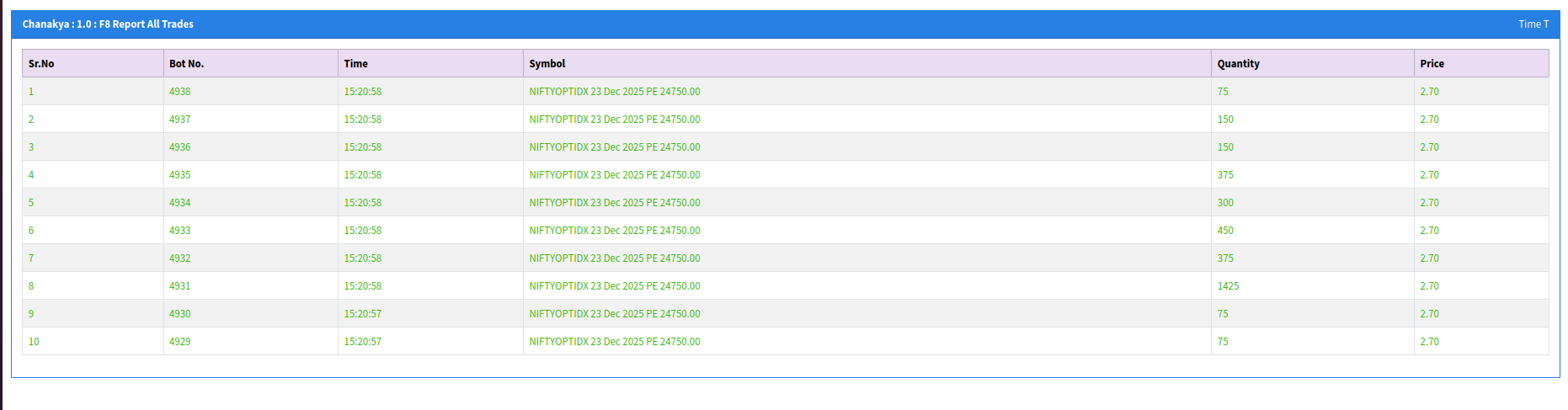
Live Trade Monitor - Real-time view of all executed trades
Detailed Net Position View
Get comprehensive position tracking with our detailed net position monitor. This view provides in-depth analysis including quantity exposure, rupee exposure, threshold quantities, buy/sell values, profit/loss calculations, and real-time margin requirements. The square-off thresholds help you manage risk effectively.
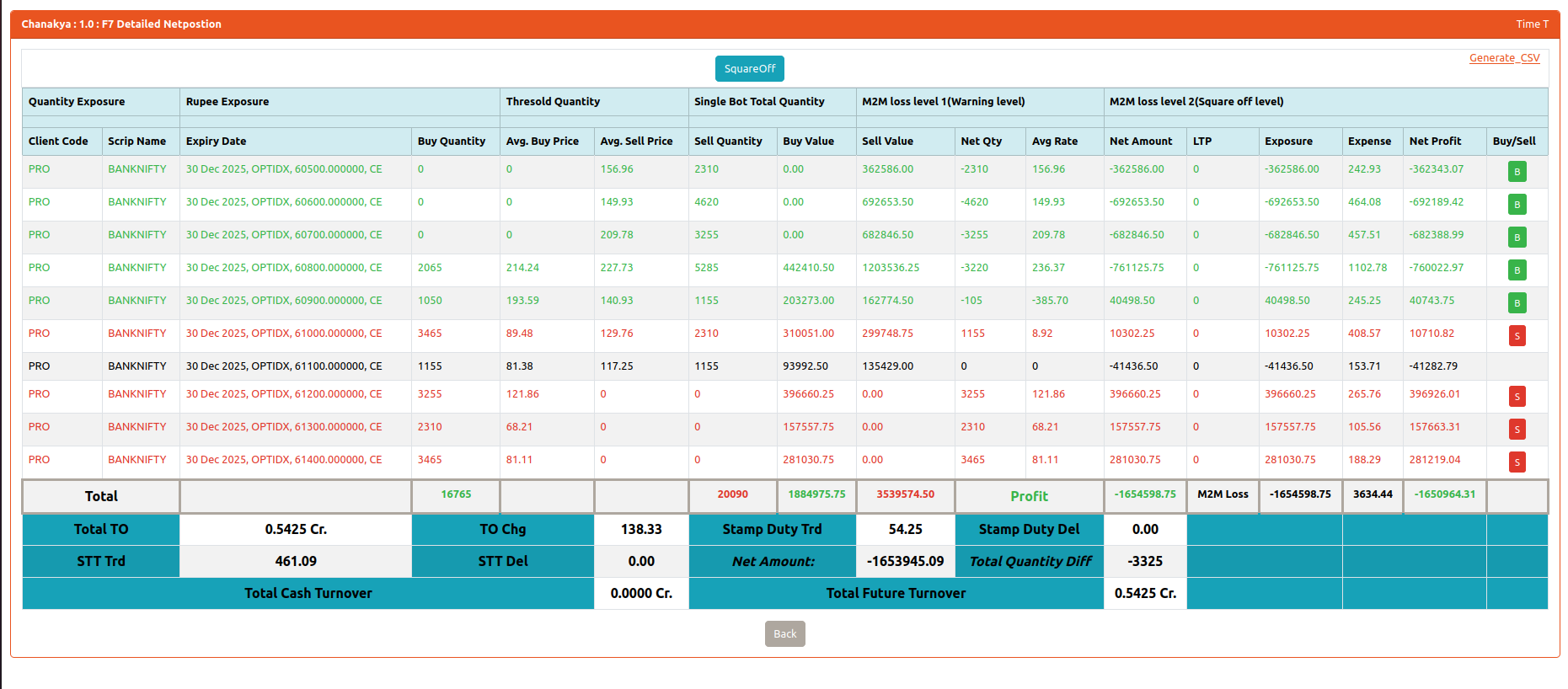
Detailed Net Position Monitor - Comprehensive position tracking with P&L analysis
Key Features
- Real-Time Updates: All trade data and positions are updated in real-time as orders are executed
- Comprehensive Metrics: Track quantity, price, exposure, margins, and profit/loss for all positions
- Risk Management: Built-in square-off thresholds
- Export Capabilities: Generate CSV reports for detailed analysis and record-keeping
Troubleshooting & FAQ
If the order execution socket disconnects due to any network issue, the Bridge API automatically cancels all open orders and shuts down to prevent unintended trades. This safety mechanism ensures no orphaned orders remain active during connectivity issues.
Yes, the Bridge API can be seamlessly integrated with exchange simulation or test environments to validate order flows and strategy behavior before live deployment. This allows you to thoroughly test your strategies in a risk-free environment.
Market data, provided directly by the broker, is delivered through a dedicated broadcast socket that runs continuously during market hours. This ensures real-time, reliable data streaming for your trading strategies.
Yes. Users can provide a configuration file specifying selected securities/instruments to subscribe to. This allows you to receive market data only for the instruments you're interested in, reducing bandwidth and processing requirements.
The exchange rejection or system level RMS rejection is sent back to the client via the response socket with appropriate error and reason codes. This allows your application to handle rejections gracefully and take appropriate action.
The Bridge API is engineered for low-latency order execution, typically delivering millisecond-level processing depending on the network topology and deployment environment. Actual latency may vary based on your infrastructure and network conditions.
Yes. Bridge API maintains detailed logs for orders, responses, trades, and system events for audit and troubleshooting. These logs are essential for compliance, debugging, and performance analysis.
The number of strategies is not limited, as the system operates over socket-based connectivity. Users can create multiple socket connections to run different strategies simultaneously, allowing for flexible and scalable trading operations.
On restart or failure, the Bridge API ensures safety by cancelling open orders and requiring fresh client connections. This prevents stale orders from being executed and ensures a clean state after any system interruption.